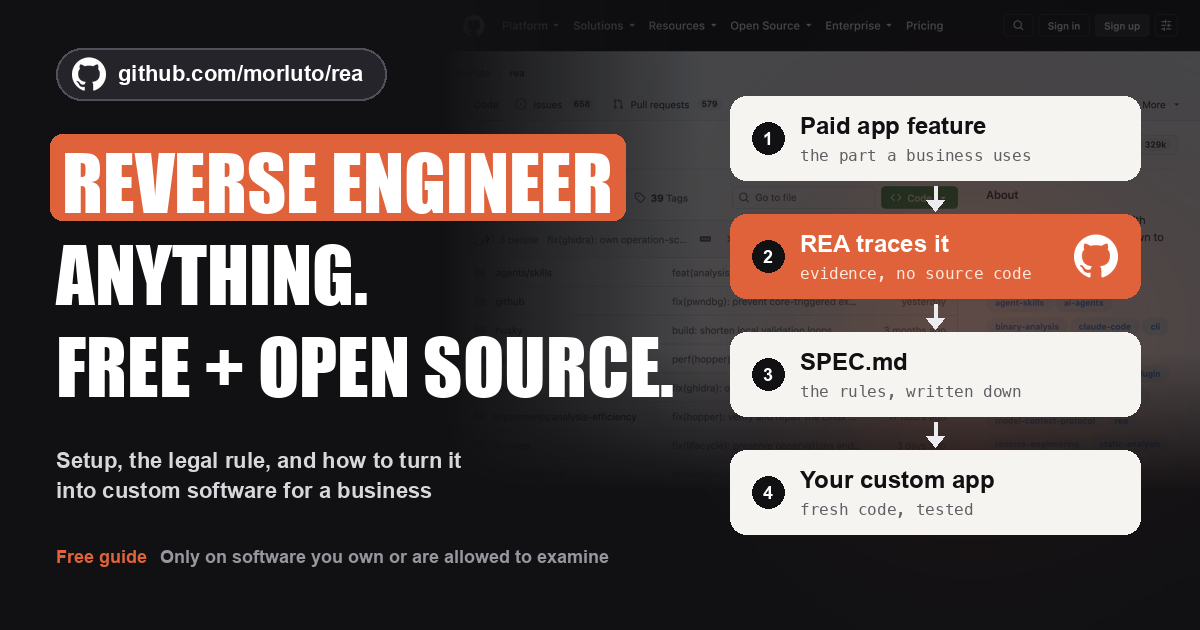
Everyone is posting that you can reverse engineer any app now. Most of those posts stop at "wow". The money is in what you do next.
REA (Reverse Engineer Anything) is a free, open-source tool that plugs into coding agents like Claude Code, Codex and Cursor. Your agent asks how a feature works. REA inspects the software on your machine and hands back evidence: the code, the references and what is still unknown. Then your agent can explain the feature or help you build your own version.
Businesses pay big yearly bills for software they use a small part of. If you can understand the few features they actually need and build those for them, cleanly and legally, that is a real service. This page gives you the repo and my process for doing exactly that.
The official REA repo
- Website: rea.tools
- npm package: rea-agents
- Install:
npx rea-agents setup - License: MIT, free. 329,131 GitHub stars on 19 October 2026 (GitHub API).
Understand the problem. Find the features. Build it clean. Charge well.
// Build this with your AI agent
Build this with your AI agent
Want to try this? Copy the setup prompt into your coding agent with this guide's link.
Read this guide: https://codewithnishant.dev/free/rea-custom-software-process/ and the official REA documentation it links to. Help me set up REA and practice the guide's process safely. First check my Node.js and npm versions and look at my current coding agent configuration without changing it. Install REA only from github.com/morluto/rea, rea.tools or the rea-agents npm package, using npx rea-agents setup, and show me the setup plan before anything is written. Do not install unrelated software. After setup, tell me to restart my agent. Then download REA's official Notes example and trace how its Export notes feature works, with file and line evidence, and list what is confirmed, what is inferred and what is still unknown. Next, help me turn my notes about one business into the feature map and SPEC.md format from section 05 of the guide. Do not analyze any third-party app until I confirm I own it or have written permission to examine it, and never copy its code, assets or brand into my project. Ask before paid tools, installs outside REA setup, or publishing anything.
01. Get the official REA repo, and skip the fake copies
Three official sources, nothing else
A repo this popular attracts copies. REA's own README names exactly three official sources: the morluto/rea repo on GitHub, the website rea.tools, and the rea-agents package on npm. It also warns that a similar repo name or a copied README does not prove a download is official.
How to stay safe:
- Check the owner. The repo URL must be
github.com/morluto/rea. Not a fork, not "rea-pro", not a lookalike name. - Install with the official command.
npx rea-agents setuppulls the npm package that lists morluto/rea as its source. You do not need a ZIP, an .exe or a "REA installer" from a video description or a chat group. - Never pay for the tool itself. REA is MIT licensed and free. If someone asks for money to give you "REA", that is not the official route.
- Read the setup plan before you approve it. Setup shows what it will change and keeps backups of your existing agent configuration.
02. What REA does, in plain words
Your agent asks. REA inspects. You get evidence.
Apps you download are compiled or bundled. You cannot just open them and read how a feature works. REA connects your coding agent to analysis tools that can read them anyway, and returns the evidence and limitations behind every conclusion. Analysis runs on your own computer.
What you can point it at, per the README on 19 October 2026:
| Target | What REA can show | What you need |
|---|---|---|
| JavaScript and Electron apps (many desktop apps) | Modules, imports, routes, IPC and source maps | Node.js and npm |
| Websites | Scripts, network requests and runtime observations | A Chrome-family browser |
| Native desktop programs | Pseudocode, assembly, strings, calls and references | Ghidra, IDA or Hopper |
| Android apps (APK) | Manifest, classes and decompiled methods | A JDK and JADX |
| .NET programs | Metadata and instructions | Nothing extra for static inspection |
One limit matters a lot for business software: REA only sees what reached your machine. If a feature runs on the company's servers, REA cannot read that code. You rebuild those from visible behavior, exports and the product's public help docs instead.
03. Install REA
About 5 minutes if Node.js is ready
- Check Node.js. Open a terminal and run
node -v. You need v22.19+, v24.11+ or v26+. If it is older or missing, install the Node.js 24 LTS from nodejs.org. - Run setup. Run
npx rea-agents setup. - Pick your agent. Setup supports Claude Code, Codex, Cursor, Gemini CLI, Grok Build and others.
- Review and approve. Read the proposed changes. Setup adds REA's MCP server and matching workflow instructions to your agent.
- Restart your agent. Then give it a local file path and one question.
Terminal
node -v
npx rea-agents setup
For native desktop programs, add an analysis engine. Ghidra is free. IDA and Hopper are paid, and REA's README says commercial tools must be legally obtained and licensed. Setup can install Hopper with your approval and uses an existing Ghidra or IDA install.
To update later, run npx rea-agents@latest setup again and restart your agent. REA releases often.
Want the deeper Claude Code walkthrough, with the official Notes practice app step by step? Read my REA + Claude setup guide.
04. The one rule: software you own or are authorized to examine
Read this before you touch a client's tools
REA's README says the project is for lawful research, education, interoperability, software preservation, and analysis of software you own or are authorized to examine. Its disclaimer says it will not help with:
- getting around DRM, license checks or anti-cheat,
- bypassing logins or access controls on systems you are not authorized to test,
- copying proprietary software or reproducing its protected code and assets.
It also says that having a file, or the software being public, does not by itself give you permission, and that reverse engineering may be restricted by the law where you live or by the software's license.
What that means for client work, in my words:
- Start with what the business owns. Their own old app, their internal tools, their own exports and data. That is the easy, clean case.
- For anyone else's software, get permission and read the license. Many licenses and terms of service limit reverse engineering. If it is not allowed, you do not do it.
- Understand behavior, then write fresh code. Use the findings to write a plain specification, then build from that spec. Never paste their code, images, brand or design into your project.
- Never unlock paid features or bypass anything that asks you to log in or pay.
- Ask a lawyer when money is involved. I am not one, and this is not legal advice.
Good news: for most business features you do not even need to go inside the app. The product's public help docs, the business's own exports and a few screen recordings of how the team uses it often tell you enough to build.
05. My process: from a business problem to custom software
Five steps. The tool is step three, not step one.
People start with the tool and look for a use. I start with the business and its bills. This is my process for turning REA, and AI coding in general, into client work.
Step 1: Understand the business problem
Sit with the owner or the team for 30 minutes. Ask where their time and money go. Then list every paid tool they use, what it costs per year, and who uses it. You are looking for one expensive tool that does a simple job for them.
Step 2: Ask which features they actually use
Big tools have hundreds of features. Most teams live inside a handful. Ask them directly:
- Which apps do you open every single day?
- If you could keep only 3 features of this tool, which 3?
- What do you wish it did that it does not?
- What do you export or copy out of it by hand?
Write the answers into a feature map. One row per feature.
Feature map
Business: ________   Tool: ________   Cost per year: ________

| Feature they use | Who uses it | How often | Where it runs (their machine or the vendor's server) | Can we see it legally? |
|------------------|-------------|-----------|-------------------------------------------------------|------------------------|
|                  |             |           |                                                       |                        |
Step 3: Reverse engineer those features, with permission
Now the tool comes in. For each feature on the map that you are allowed to examine, give your agent one narrow question. "How does the export decide which fields to include?" works. "Clone this app" does not.
Ask for evidence, not a story: the file, function or request behind the answer, plus what it could not confirm. For features that live on a vendor's server, use behavior, exports and public docs instead. Then turn each feature into a short spec.
SPEC.md, one per feature
# Feature: ________

What it does (one sentence):
Inputs:
Outputs:
Rules we confirmed (with evidence):
Rules we inferred (not confirmed):
Edge cases:
Still unknown:
Test cases (input, expected output):
Step 4: Build custom software from the spec
Build fresh code from the spec, not from anything you found inside the app. Then test it against the behavior you recorded. REA's own DX-Ball showcase does this at the extreme: the rebuilt calculation passes 3,205 test cases against the original program.
This is also where you beat the original. Add what the big tool never had for this business: their language, their exact workflow, WhatsApp alerts, one screen instead of five. Plan from day one how their data moves over and who fixes bugs later.
New to building with AI agents? The 8 files to write before you vibe code keep a build like this from turning into a mess.
Step 5: Charge well
Price on the value you create, not on your hours. The business compares you to the yearly bill they already pay.
Example math, made up to show the idea: a team pays ₹4,00,000 a year for a tool and uses 3 features. You build those 3 for ₹1,50,000, plus ₹10,000 a month for hosting and support. Year one costs them ₹2,70,000 instead of ₹4,00,000, and you earn monthly income for as long as it runs. Use their real numbers, not mine.
Two things to put in writing: who owns the code, and what the monthly fee covers. Need help landing the first one? Read my first client playbook.
06. Real examples, with sources
Reported by others. None of these are my results.
A company that dropped a $40,000 tool
BigGo Finance reported on 22 July 2026 that Hank AI, a South Carolina healthcare software company with 24 full-time employees, decided in January not to renew its $40,000 a year Salesforce contract. It built its own application with Claude Code instead, at an estimated $500 a year. The same report covers other small businesses that replaced Salesforce with custom builds.
To be clear: that report is about building with AI coding tools, not about REA. I include it because it shows the demand behind step 1. Businesses will swap an expensive tool for a custom one that fits.
What REA itself has shown
These are the official worked examples on the REA repo and rea.tools, checked on 19 October 2026.
| Example | What was found | Source |
|---|---|---|
| Notion | How copy works: from the page, through the app's bridge, to the system clipboard, keeping rich block data | Case study |
| DX-Ball (1996 game) | The sound-pan calculation, rebuilt in C, passing 3,205 tests against the original | Case study |
| Touhou 4 (TH04) | How the DOS game aims a ring of bullets, from 16-bit code | Case study |
| Aegis Authenticator | How the Android app makes its 6-digit login code that changes every 30 seconds | Case study |
| Windows Calculator | Why 200 + 10% gives 220, and why % acts differently after × | rea.tools |
| Chrome dinosaur game | The speed rule: starts at 6, adds 0.001 each update, stops at 13 | rea.tools |
Notice the pattern. Each one answers one narrow question about one feature, with proof. That is the skill you sell.
You may also have seen claims that people rebuilt Spotify, Loom or QuickBooks with REA. I could only find a creator's own video and two blog mentions with no named builder or code to check, so I do not count them as proof here.
07. Where it goes wrong
Most of the slop comes from these
| Problem | Fix |
|---|---|
| Installing a fake copy | Only morluto/rea, rea.tools or the rea-agents npm package |
| Asking "clone this whole app" | One feature, one narrow question at a time |
| Believing the AI's story | Ask for the evidence and the unknowns every time |
| Tests pass, feature still wrong | Check the tests themselves. A weak test can pass broken code |
| Feature runs on the vendor's server | REA cannot see it. Rebuild from behavior, exports and public docs |
| Native app, no engine installed | Install Ghidra (free), or use IDA or Hopper with a real license |
| Copying code, assets or design | Spec first, fresh code second. Nothing pasted from the original |
| Client data sent to your AI | REA runs locally, but your agent's model provider sees the results. Keep secrets and personal data out |
08. Copyable prompts
Use them in order, one feature at a time
1. Investigate one feature
Use REA to inspect [path to the app or file I own or am authorized to examine]. Explain how [one feature] works. Show the evidence: files, functions, requests or instructions. List what is confirmed, what is inferred and what is still unknown. Do not modify the target.2. Write the spec
Turn your findings into SPEC.md for this one feature: what it does, inputs, outputs, confirmed rules with evidence, inferred rules, edge cases, unknowns, and 10 test cases with expected outputs. Describe behavior only. Do not include any code from the original app.3. Build and test
Build this feature fresh from SPEC.md in my project. Write the test cases from the spec first, then the code, then run the tests and show me the results. Flag anything in the spec that was only inferred so I can confirm it with the business.09. FAQ
Where is the official REA repo?
The official REA (Reverse Engineer Anything) repo is github.com/morluto/rea. The project's own README lists three official sources: that repo, the website rea.tools, and the rea-agents package on npm. A similar repo name or a copied README does not make a download official.
Is REA free?
Yes. REA is open source under the MIT license. Your AI coding agent plan and any commercial analysis tool, such as IDA or Hopper, can cost money separately. Ghidra is a free option for native apps.
How do I install REA?
Install Node.js 22.19 or newer in the 22 line, 24.11 or newer in the 24 line, or 26 and newer. Then run npx rea-agents setup in a terminal, choose your coding agent, review the proposed changes, approve them and restart the agent. Setup supports Claude Code, Codex, Cursor, Gemini CLI, Grok Build and other agents.
Is it legal to reverse engineer an app with REA?
REA's README says it is for lawful research, education, interoperability, software preservation and analysis of software you own or are authorized to examine. Its disclaimer adds that reverse engineering may be restricted by the law where you live or by the software's license. Get permission in writing, read the license, and ask a lawyer when money is involved. This guide is not legal advice.
Can REA see a SaaS app's server code?
No. REA inspects what is on your machine: the installed app, the website code your browser loads, an APK and similar files. Code that runs only on the company's servers never reaches you, so for those features you rebuild from visible behavior, exports and the product's public help docs.
Do I need Ghidra, IDA or Hopper for REA?
Only for deep analysis of native desktop programs. Static JavaScript, Electron and .NET inspection work without a native analysis engine. REA setup can install Hopper after your approval, and it uses an existing Ghidra or IDA installation.
Can I sell software I build after using REA?
You can sell your own original software. What you should not do is copy the other product's code, assets, brand or design, unlock paid features, or skip the permission and license checks. Write a specification of the behavior, build fresh code from it, and get legal advice before you sell anything that competes with the original product.
10. Sources and what I checked
Checked 19 October 2026
REA changes fast. Recheck these before you rely on them.
- morluto/rea on GitHub: the README, official sources, install command, Node.js versions, supported agents, targets, showcases, MIT license and the lawful-use statement. Stars and license from the GitHub API.
- REA disclaimer: what the project will not help with, and your responsibility for permission.
- rea.tools, its get started page, FAQ and showcases: setup steps, the Hopper, Ghidra and IDA requirement, the Calculator and dinosaur examples and the case studies.
- rea-agents on npm: version 6.7.0 on 19 October 2026, linked to the morluto/rea repo.
- BigGo Finance, 22 July 2026: the Hank AI and Salesforce report.
What I checked, and what I did not
I read the sources above on 19 October 2026 and checked every REA fact on this page against them. While making the reel, the official rea-agents 6.7.0 command line was run on a small demo app made for it, using static JavaScript analysis only. I have not run REA on any client's software, I did not run native analysis for this guide, and the Hank AI numbers are BigGo Finance's report, not mine. The 5-step process and the example math are my opinion of how to do this work well, not measured results.
Don't clone the app. Understand the feature, build it clean, and charge for the problem you solved.
// Free newsletter
I send out guides like this every week
Real setups, real sources, no hype. Drop your email and I'll send you the next one.