
TradingAgents is a free, open source Python framework from Tauric Research, founded by Yijia Xiao. You give it a ticker and a date. A team of AI agents reads the data, debates, and returns one rating. It does not place any orders.
One AI gives you one opinion. This one makes them argue first.
// Build this with your AI agent
Build this with your AI agent
Want to try this? Copy the setup prompt into your coding agent with this guide's link.
Read this guide: https://codewithnishant.dev/free/tradingagents-setup-guide/ and the official TradingAgents README linked from it. Help me install TradingAgents on this machine. Inspect my setup first: Python version, and whether I want an API key, my ChatGPT plan or a local Ollama model. Never print my keys. Then run one analysis on RELIANCE.NS for a recent trading day with one debate round and save the report. Explain the rating in simple words and tell me which data sections came back empty. Do not connect any broker and do not place any trade.
01. What the AI team does
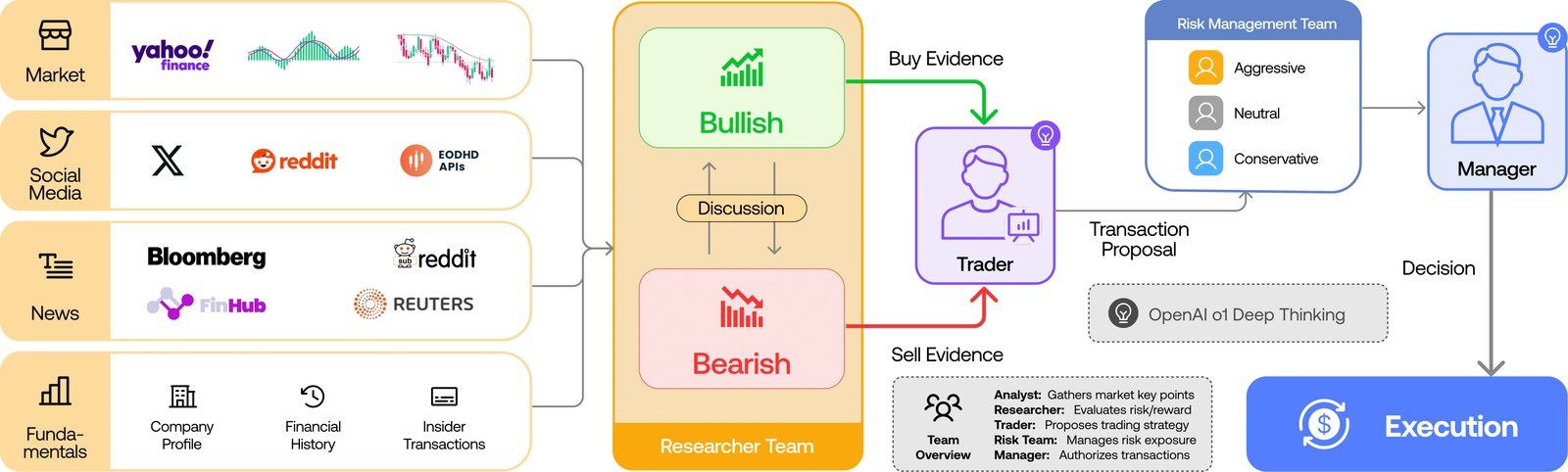
It copies how a trading firm splits work. Each team gets a job:
| Team | Its job |
|---|---|
| 4 analysts | Read fundamentals, sentiment, news and technical indicators, all at the same time |
| Bull and bear researchers | Debate the analysts' reports, one for buying, one against |
| Trader | Turns the debate into a proposal |
| Risk team | Three agents (risky, neutral, safe) argue about what could go wrong |
| Portfolio manager | Makes the final call and gives the rating |
The final rating is one of five: Buy, Overweight, Hold, Underweight or Sell. You can see the list in rating.py.
02. Set it up
About 10 minutes if Python is ready
These steps come from the official README, version 0.7.1. You need Python 3.11 or later.
1. Get the code and install it:
git clone https://github.com/TauricResearch/TradingAgents.git
cd TradingAgents
uv venv --python 3.13
source .venv/bin/activate
uv pip install .
No uv? Make any Python 3.11+ environment and run pip install . instead. Docker works too: cp .env.example .env, add your keys, then docker compose run --rm tradingagents.
2. Pick your model. You need only one of these:
- API key:
export OPENAI_API_KEY=...The README lists many others, like Google, Anthropic, DeepSeek and OpenRouter. - ChatGPT Plus or Pro: run
tradingagents login chatgptand choose Subscription in the provider menu. It counts toward your plan's limits. - Local model: run it through Ollama. No API bill, but your machine does the work.
Want cheap model options? My free LLM APIs guide lists them. Check that a provider is supported before you rely on it.
3. Run it:
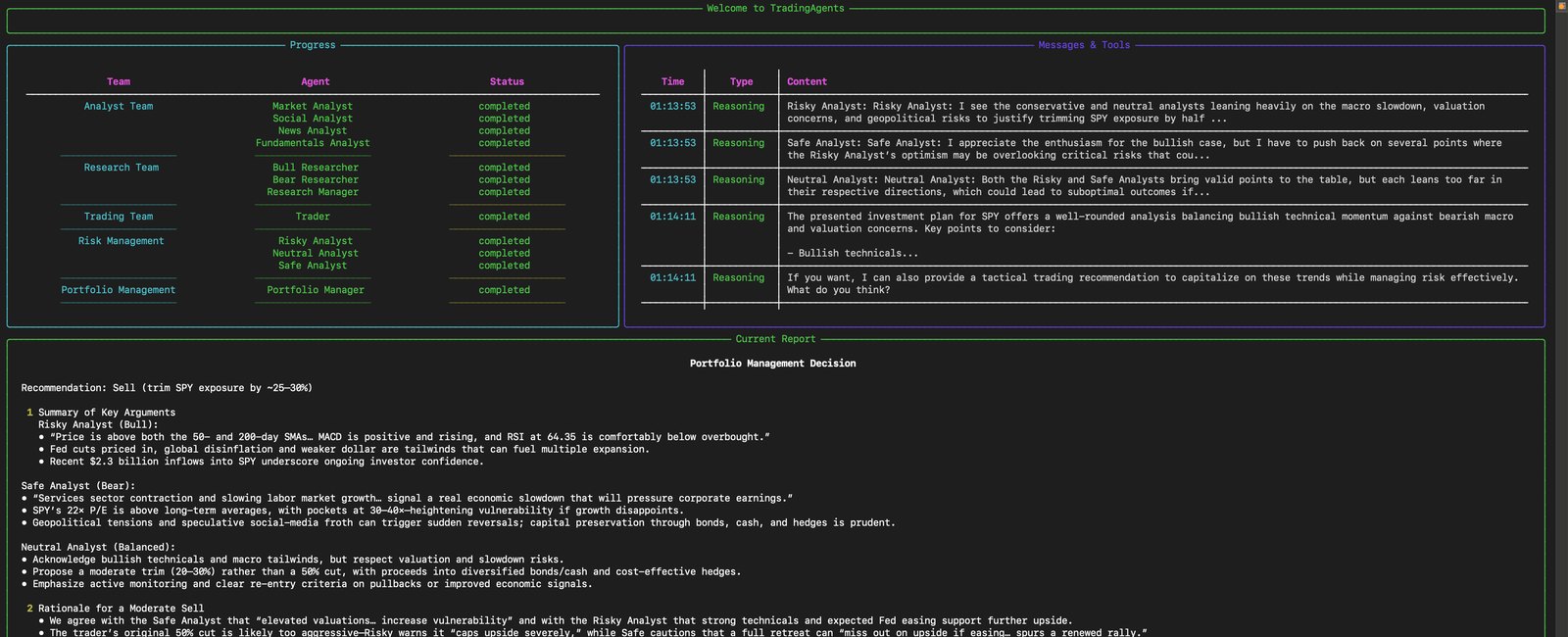
tradingagentsA screen asks for your ticker, date, provider and research depth. Then you watch the agents work live. Save the report when it asks, and you get a complete_report.html you can read on your phone.
03. Run it on Indian stocks
It works with any market Yahoo Finance covers. For India, add the exchange suffix:
- NSE:
RELIANCE.NS - BSE:
.BOat the end of the ticker
Now the part to watch. These are reported by users on GitHub:
- Macro data is US-only. A RELIANCE.NS run talked about US inflation and the US Fed rate (issue 1355, open).
- News can be empty. Yahoo Finance has no news for some Indian stocks (issue 1624, open).
- A wrong ticker can still give a rating. One user's mistyped ticker got no data at all, ran for about 12 minutes and still printed a normal Hold (issue 1621, open).
So do two checks every time: confirm the ticker on Yahoo Finance first, then read the report's data sections before you read the rating.
I found no public output from a real RELIANCE.NS run, so compare any report you get with your own research.
04. It does not actually trade
The README mentions a simulated exchange, but the code has no broker connection. The repo's own backtest.py says it is not a portfolio simulator. You get a report and a rating. What you do next is on you.
Some separate forks, like AlpacaTradingAgent, add broker connections and even live trading. Those are other projects, not this one. Read their code before you connect real money.
05. The test result most posts skip
Most posts stop at the big numbers. Here they are, from Table 1 of the TradingAgents paper:
| Stock | TradingAgents return | Buy and hold | Sharpe ratio |
|---|---|---|---|
| Apple | 26.62% | -5.23% | 8.21 |
| 24.36% | 7.78% | 6.39 | |
| Amazon | 23.21% | 17.1% | 5.60 |
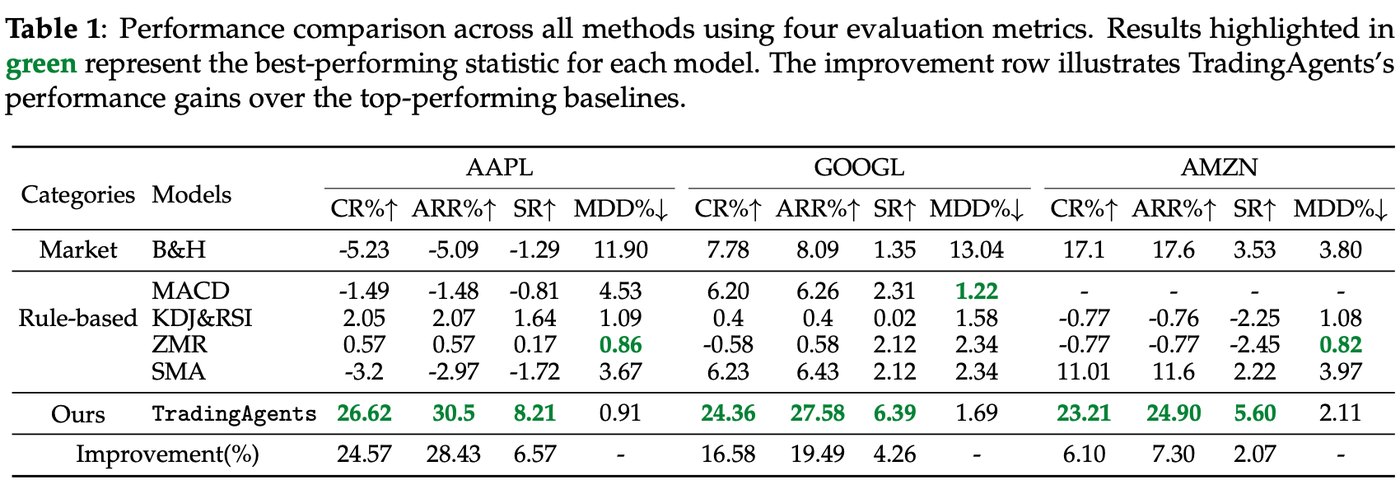
Looks huge. Now read what sits around those numbers:
- Only 3 months. The test ran from 1 January to 29 March 2024. The authors say they kept it short because of heavy model use.
- Only 3 stocks in the table. That is too few to tell skill from luck.
- Even the authors flag the Sharpe. They write that it "exceeds our expected empirical range" and put it down to few pullbacks.
- No trading costs mentioned. The words transaction cost and slippage do not appear in the paper, and real trades pay both.
- It beat simple rules only. The comparison is buy and hold plus rule-based strategies, not other AI systems or human traders.
- The models may have seen that period. A Hacker News commenter raised this. The test used 2024 data with public models.
- You may not get the same result. The README says backtests may not match any published figure, and two runs of the same stock can differ.
So this is interesting research, not proof it makes money. Want your own number? Run a backtest on stocks you know:
tradingagents backtest RELIANCE.NS,INFY.NS --start 2026-06-01 --end 2026-08-01 --every 7That is the README's command with Indian tickers swapped in, and I have not run it. It makes many model calls, so check the cost first.
06. What it costs and how long it takes
There is no official price. These are other people's numbers, not mine:
- Money: Railway's deploy page estimates $0.20 to $0.80 per ticker with GPT-4o models and 1 debate round. Stronger models and more rounds cost more.
- Calls: one code walkthrough counted at least 15 model calls per decision, and at least 216 for the README's small backtest example.
- Time: a 2026 research paper measured more than 240 seconds on the fastest setup. One user logged about 13 minutes on an older version (issue 111).
Set a spending limit with your model provider before you run a backtest.
07. How to use it well
- Treat it as a second opinion. It is a research helper, and the makers say so too: outputs can sound confident and still be wrong.
- Read the bear case first. The debate is the useful part, more than the final word.
- Start small. One stock, one debate round, fewer analysts. Then add more.
- Run it twice. If two runs disagree, that tells you how sure it really is.
- Keep it away from your money. No broker connection until you have tested it for a long time.
Want it running on a server instead of your laptop? My free Oracle server guide covers that part.
FAQ
Is TradingAgents free?
The code is free and open source under Apache-2.0. You pay for the AI model it calls, unless you run a local model through Ollama or use your ChatGPT Plus or Pro plan, which counts toward that plan's limits.
Does TradingAgents work on Indian stocks?
Yes. Use the exchange suffix, like RELIANCE.NS for NSE or .BO for BSE. Open GitHub issues report that macro data is US-only and that Yahoo Finance has no news for some Indian stocks, so check those sections of the report.
Does TradingAgents actually place trades?
No. The official repo gives you a rating and a report. Its code has no broker connection, even though the README mentions a simulated exchange. Some separate forks add broker connections.
Is TradingAgents profitable?
Nobody can promise that from what is public. The paper reports strong returns on a 3-month backtest in 2024, on three stocks in its results table, and its authors flag their own Sharpe ratios as unusually high.
What ratings does TradingAgents give?
Buy, Overweight, Hold, Underweight or Sell. If it cannot read a rating from the model's output, it returns REVIEW instead of guessing a Hold.
Can I run TradingAgents without an API key?
Yes, in two ways. Choose Subscription in the CLI's provider menu and sign in with your ChatGPT Plus or Pro plan, or run a local model through Ollama.
How long does one TradingAgents run take?
Expect minutes, not seconds. One research paper measured more than 240 seconds on the fastest setup, and a GitHub user logged about 13 minutes on an older version.
What I checked, and what I did not
On 1 November 2026 I read the official repo at version 0.7.1, the paper, the disclaimer and the GitHub issues linked above. I did not install TradingAgents, run it on any stock, or check its returns. Numbers here are the sources' numbers. Nothing here is financial advice. Thanks to Tauric Research and the paper's authors for the public code and research.
Set it up, run one stock you already know well, and see if the debate teaches you something. That is the real test.
// Free newsletter
I send out guides like this every week
Real setups, real sources, no hype. Drop your email and I'll send you the next one.