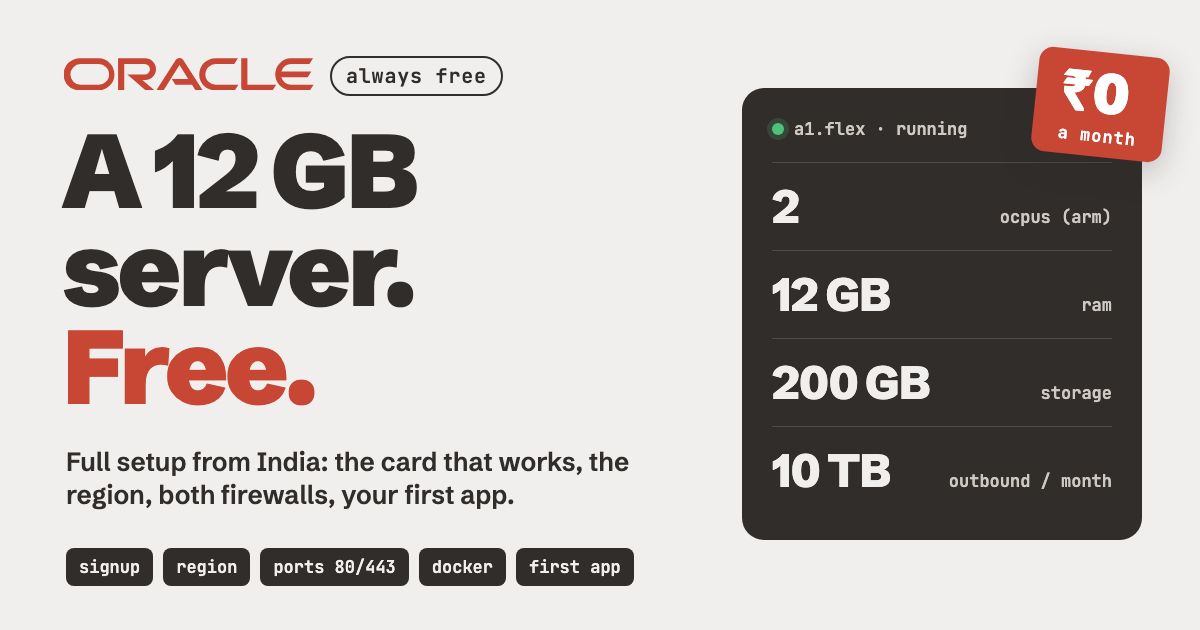
Most people pay for hosting before they need to. Oracle Cloud gives you a real server with 12 GB RAM for ₹0, and it keeps running after the trial ends.
The catch is the setup. Indian cards fail, the region choice is permanent, and one firewall step trips up almost everyone. This guide walks you through all of it, in order.
A real server. 12 GB RAM. ₹0 a month.
// Build this with your AI agent
Build this with your AI agent
Want to try this? Copy the setup prompt into your coding agent with this guide's link.
Read this guide: https://codewithnishant.dev/free/oracle-cloud-free-server/ and the official Oracle, Docker, Coolify and n8n docs it links to. I already created my Oracle Cloud account and an Ubuntu VM on the VM.Standard.A1.Flex shape. Help me get my first app live on it. Ask me for the server's public IP and the path to my SSH key, then connect with ssh as the ubuntu user. Check which ports are open in Ubuntu's iptables and tell me exactly which ingress rules I still need to add in my VCN security list (I will click those myself in the Oracle console). Open ports 80 and 443 in iptables the way the guide shows and save the rules. Install Docker, then install either Coolify or n8n, whichever I pick. Never print or store my passwords or keys. When it is done, show me the URL that loads in my browser, how to log in, and anything still incomplete. Ask before anything that costs money, like upgrading my Oracle account.
01. What you get free
Oracle's Always Free limits
These are Oracle's own numbers from its Always Free resources page, read on 24 October 2026. They stay free for the life of the account.
| What | Free amount |
|---|---|
| Arm server (Ampere A1) | 2 OCPUs + 12 GB RAM in total |
| Storage | 200 GB (boot disks and extra volumes combined) |
| Backups | 5 volume backups |
| Outbound data | 10 TB a month |
| Small extra servers | 2 AMD micro VMs (1/8 OCPU, 1 GB RAM each) |
The Arm part is the star. You can use it as one server with 2 OCPUs and 12 GB, or split it into two smaller ones. Each server takes a 50 GB boot disk by default, out of the 200 GB.
Signup also comes with a 30-day trial with free credits. That is separate. When the trial ends, the Always Free resources above keep running.
02. Sign up (the card rules)
Where most Indian signups fail
Sign up at oracle.com/cloud/free. Oracle asks for a card only to check you are a real person. Its signup docs spell out the rules:
| Card | Works? |
|---|---|
| Visa or Mastercard credit card | Yes, best choice |
| Debit card with a Visa or Mastercard logo that needs no PIN | Oracle allows it, but many Indian debit cards still fail |
| RuPay card | No, it is not one of the networks Oracle lists |
| Prepaid, virtual or single-use cards | Usually no |
Before you enter the card:
- Turn on international and online payments for that card in your bank app.
- Switch off any VPN. Use your normal home or mobile internet.
- Try once, carefully. If you see "Error Processing Transaction", do not make new accounts. Use Oracle's signup support instead.
You may see a small temporary charge. Oracle calls it a verification hold, and it is removed automatically. In Oracle's words, your card "won't be charged unless you elect to upgrade".
03. Pick your home region
You choose once, forever
During signup you pick a home region. Oracle's docs are clear: you can't change this after signing up. Your free servers can only be created in that region.
| Region | Good for | Watch out |
|---|---|---|
| India West (Mumbai) | Fast for users across India | The busiest, free Arm capacity runs out often |
| India South (Hyderabad) | Also close to Indian users | Community reports say capacity is a little easier |
| Singapore | A fallback if India is always full | Further away, so a bit slower for Indian users |
My take: pick Hyderabad or Mumbai if your users are in India. Capacity changes all the time, so treat the "watch out" column as what builders report, not a promise.
04. Create the server
VM.Standard.A1.Flex, Ubuntu, your SSH key
Once your account is ready, open the Oracle console and go to Compute, Instances, Create instance. Set these:
- Image: Canonical Ubuntu 24.04. After you pick the Arm shape, the console shows the Arm build of the image.
- Shape: click Change shape, pick Ampere, then
VM.Standard.A1.Flex. Set 2 OCPUs and 12 GB memory. - Networking: let Oracle create a new VCN and public subnet, and keep "Assign a public IPv4 address" on.
- SSH key: upload your public key, or let Oracle generate a key pair and download the private key. You cannot download it again later.
- Boot volume: the default 50 GB is fine to start.
Click Create. When it shows Running, copy the public IP and connect from your laptop:
Your laptop terminal
chmod 400 ~/Downloads/your-key.key
ssh -i ~/Downloads/your-key.key ubuntu@YOUR_PUBLIC_IP
Seeing "Out of host capacity"?
This is the most common error, and it is not your fault. It means Oracle has no free Arm machines left in your region at that moment. Oracle's own community answers say to try again later. What works:
- Retry later. Early morning or late night often works better. It can take a few tries over a few days.
- Start smaller. Try 1 OCPU and 6 GB first, then create a second one later or resize.
- Upgrade to Pay As You Go. Oracle says it still does not charge for Always Free resources after you upgrade, only for usage above the limits. Builders report Arm capacity is easier on paid accounts. Set a budget alert if you do this (section 09).
- Use the free AMD micro VM meanwhile to practise Linux while you wait.
05. Open ports 80 and 443
Two firewalls, not one
This is the mistake almost everyone makes. You install a website, open the IP in your browser, and nothing loads. Oracle has two firewalls, and you must open the port in BOTH:
| Firewall | Where it lives | How you open it |
|---|---|---|
| 1. VCN security list | Oracle's network, outside your server | Click in the Oracle console |
| 2. iptables | Inside Ubuntu on your server | Two commands over SSH |
Firewall 1: the VCN security list
Steps from Oracle's Ubuntu web server tutorial:
- Go to Networking, Virtual Cloud Networks and open your VCN.
- Click your subnet, then Default Security List.
- Click Add Ingress Rules: Source CIDR
0.0.0.0/0, IP Protocol TCP, Destination Port Range80. - Add one more rule the same way for
443.
Firewall 2: Ubuntu's iptables
Oracle's Ubuntu images block incoming traffic in iptables, even though Ubuntu's own firewall tool is off. Run these on the server:
On your Oracle server
sudo iptables -I INPUT 6 -m state --state NEW -p tcp --dport 80 -j ACCEPT
sudo iptables -I INPUT 6 -m state --state NEW -p tcp --dport 443 -j ACCEPT
sudo netfilter-persistent save
The -I INPUT 6 part matters. It puts your rule above the existing "reject everything" rule. If you add it at the end, the reject rule wins and your site stays blocked. Check with:
sudo iptables -L INPUT -n --line-numbersYour ACCEPT rules for 80 and 443 should sit above the REJECT line. Use the same two steps for any other port an app needs, like 8000 for Coolify or 5678 for n8n.
06. Install Docker
So every app installs the same way
Docker runs each app in its own box, so installs are one command and nothing clashes. Docker supports Arm (arm64) on Ubuntu 22.04 and 24.04. These commands are from Docker's Ubuntu install page:
On your Oracle server
curl -fsSL https://get.docker.com -o get-docker.sh
sudo sh get-docker.sh
sudo usermod -aG docker $USER
Log out and SSH back in, then test it:
docker run hello-worldDocker calls this quick script best for testing and development. For a long-running production server, its page also shows the full apt repository method.
07. Put your first app live
Pick one: Coolify or n8n
Option A: Coolify (my pick)
Coolify is a free, open-source dashboard for deploying apps, databases and one-click services on your own server. It needs 2 CPU cores, 2 GB RAM and 10 GB disk, and supports arm64, per its install docs. Your free server clears that easily.
On your Oracle server
curl -fsSL https://cdn.coollabs.io/coolify/install.sh | sudo bashOpen port 8000 in both firewalls (section 05), then visit http://YOUR_PUBLIC_IP:8000. Create your admin account straight away, before anyone else finds the page.
Coolify's firewall page also lists 6001 (live dashboard updates) and 6002 (web terminal) for IP access. Once you point a domain at Coolify, you can close 8000, 6001 and 6002 and keep only 22, 80 and 443.
Option B: n8n on its own
Want automations first? Run n8n directly with Docker. This is n8n's official Docker command, changed to keep running in the background:
On your Oracle server
docker volume create n8n_data
docker run -d --restart unless-stopped --name n8n -p 5678:5678 -e GENERIC_TIMEZONE="Asia/Kolkata" -e TZ="Asia/Kolkata" -e N8N_ENFORCE_SETTINGS_FILE_PERMISSIONS=true -e N8N_SECURE_COOKIE=false -v n8n_data:/home/node/.n8n n8nio/n8n
Open port 5678 in both firewalls, then visit http://YOUR_PUBLIC_IP:5678. The N8N_SECURE_COOKIE=false line only lets you log in over plain http for this first test. Before real use, put n8n behind a domain with HTTPS (Coolify does this for you) and remove it.
08. What to run on it
Same server, three kinds of people
For builders: your own deploy platform
With Coolify on the server, you get your own mini Vercel. Connect a GitHub repo, push code, and it deploys. Add a domain and Coolify sets up HTTPS. Spin up Postgres, Redis or a one-click app from its service list when you need it.
- Side projects and client demos live, with no monthly hosting bill.
- Several small apps on one server, as long as they fit in 12 GB.
For businesses: leads, follow-ups and reports
Pair an open-source CRM with n8n and you have a small sales system on a free server. Twenty is an open-source CRM with a Docker setup, and its image on Docker Hub includes an arm64 build. An example flow (labelled example, adjust to your business):
- Leads: a website form or ad lead goes to n8n, which adds it to Twenty.
- Follow-ups: n8n sends a reminder or a follow-up mail if nobody replied in 2 days.
- Reports: every Monday n8n counts new leads and won deals and mails you a short summary.
Need leads to fill it? My Google Maps scraper kit runs in Docker too.
For students: real skills, real projects
A free server is the best Linux lab you can get. You learn what jobs actually ask for, on a real machine on the internet:
- Linux: SSH, users, files, logs and firewalls.
- Docker: run, stop and update apps the way companies do.
- Deployment: put your college project on a public link your teacher or a recruiter can open.
Building your first project? Start with app idea to shipped app.
09. Keep it running
Two rules to know
The idle rule. Oracle can reclaim an Always Free server it sees as idle. Per its Always Free docs, that is when over 7 days the 95th percentile CPU use is under 20%, network use is under 20%, and (for Arm servers) memory use is under 20%. A server running a real app every day is usually fine.
Stay inside the free limits. Only create the free shapes (A1 Flex up to 2 OCPUs and 12 GB in total, plus the AMD micro). If you upgrade to Pay As You Go, open Billing and Cost Management, Budgets and set a small budget alert, so you get a mail before anything ever costs money.
One more thing: free offers can change over time. Keep a backup of anything important, using the 5 free volume backups or a copy on your own laptop.
10. Common problems
Quick fixes
| What happens | Try this |
|---|---|
| Card declined at signup | Use a Visa or Mastercard credit card, turn on international payments, no VPN (section 02) |
| "Out of host capacity" | Retry later, try 1 OCPU and 6 GB, or upgrade to Pay As You Go (section 04) |
| SSH says permission denied | Run chmod 400 on your key and log in as ubuntu, not root |
| App runs but the browser times out | The port is closed in one of the two firewalls. Check both (section 05) |
| Rule added but still blocked | Your iptables rule is below the REJECT line. Insert it with -I INPUT 6 |
| An app will not start | Check it has an arm64 image. Most popular apps do, a few older ones do not |
11. FAQ
Is the Oracle Cloud free server really free?
Yes. Oracle's Always Free resources have no end date and Oracle says they stay free for the life of the account, even after you upgrade to Pay As You Go. Oracle can reclaim idle instances, and like any free offer the limits can change, so keep backups of anything important.
Why does my RuPay card fail on Oracle Cloud signup?
Oracle asks for a credit card, or a debit card with a major card logo such as Visa, Mastercard, Discover or American Express that does not need a PIN. RuPay is not on that list. Use a Visa or Mastercard credit card, with international and online payments turned on.
Will Oracle charge my card?
Oracle may put a small temporary hold on your card to verify it. The hold is removed automatically. Oracle says your card is not charged unless you choose to upgrade your account.
What does Out of host capacity mean?
It means Oracle has no free Arm machines left in your region right now. It is common and not your fault. Try again later, try a smaller size first, or upgrade to Pay As You Go, which keeps the Always Free resources free.
Which Oracle Cloud region should I pick in India?
India West (Mumbai) or India South (Hyderabad) keep your server close to Indian users. Mumbai is the busiest, so free Arm capacity can be harder to get there. You cannot change your home region later, so decide before you sign up.
What can I run on a 12 GB Oracle free server?
Plenty for one person or a small business: n8n for automations, Coolify to deploy your apps, an open-source CRM like Twenty, bots, small AI agents and college projects. Pick apps that publish an Arm (arm64) build.
12. Sources
Checked 24 October 2026
Cloud limits and console screens change. Recheck Oracle's page before you rely on a number.
- Oracle: Always Free resources: the Arm, AMD, storage, backup and outbound limits, home region rule, idle rule and Pay As You Go note.
- Oracle: sign up for the free promotion: card rules, verification hold, no charge unless you upgrade, permanent home region.
- Oracle: web server on Ubuntu tutorial: the security list ingress rule and the iptables commands.
- Docker: install on Ubuntu: the install script and arm64 support.
- Coolify: installation and firewall ports: requirements, install command and ports.
- n8n: Docker install: the volume and run command.
- Twenty: self-hosting and its Docker Hub image: the Docker setup and arm64 build.
- Oracle Customer Connect: Arm compute: community reports on Out of host capacity. Community answers, not official docs.
- DEV Community: free Oracle VPS from India: one builder's report on RuPay and Indian regions. A community source.
What I checked, and what I did not
I read every official page above on 24 October 2026 and took each limit and command from it. The region capacity notes and the capacity tips come from community reports, and I label them that way. I give no speed numbers or uptime claims of my own.
Stop paying for a server you have not outgrown yet. Get the free one, open both firewalls, and ship.
// Free newsletter
I send out guides like this every week
Real setups, real sources, no hype. Drop your email and I'll send you the next one.