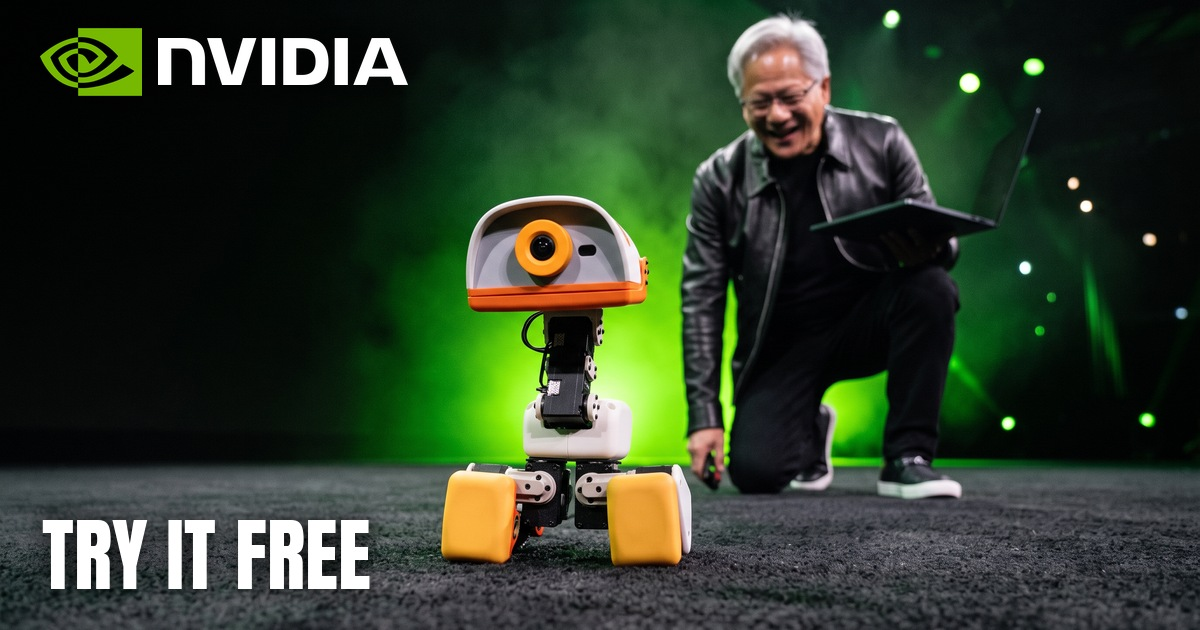
Open the Microduck simulator, press Enter, and hold the up arrow. That is the whole setup. The duck you are driving runs the same trained policies as the real robot, according to the page itself.
Microduck is a $399 robot from Pollen Robotics, the robotics team at Hugging Face. It got famous fast when Jensen Huang brought four of them onstage at NVIDIA's GTC Berlin keynote.
You do not need the duck to start.
// Build this with your AI agent
Build this with your AI agent
Want to try this? Copy the setup prompt into your coding agent with this guide's link.
Read this guide: https://codewithnishant.dev/free/microduck-simulator/ and the official microduck_rl README linked from it. Help me train a Microduck walking policy in simulation and watch it walk. Inspect my machine first. If I have a CUDA GPU, use the guide's local route. If I do not, set up the --hf-jobs route, show me the job spec with --dry-run, and ask before any paid run. Install only what the README needs, keep the repo in a new folder, and preserve my unrelated work. Ask only for missing logins such as Hugging Face or Weights and Biases, and let me enter them myself. Tell me if you cannot access a page or a tool, rather than guessing. When it finishes, export the policy to ONNX, drive it with the keyboard using the README's inference script, and show me how to run it again and anything still incomplete.
01. Try it in your browser
About 2 minutes, nothing to install
- Open the simulator on Hugging Face on a laptop or desktop.
- Press Enter, or click Waddle In.
- Click once on the scene, then drive with the keys below.
| Key | What it does |
|---|---|
| Arrow keys or WASD | Walk and turn |
| Q or E | Kick the ball |
| R | Sit |
| Space | Reset |
| Mouse drag and scroll | Move the camera |
The start screen also lists keys for picking things up and changing the camera. Switch the mode at the bottom of the screen from Feet to Rollers to try it on roller skates.
02. What Microduck actually is
From Pollen's press kit
| Spec | Detail |
|---|---|
| Maker | Pollen Robotics, the Bordeaux robotics team at Hugging Face |
| Price | $399 before taxes and shipping, listed as introductory |
| Size | 25 cm tall, 14 cm wide, under 800 g |
| Body | 15 motors, camera, compact LiDAR, 2 IMUs, grasping beak |
| Moves | Walks, sits, crouches, roller-skates, picks things up, gets up from many falls |
| Battery | Removable, around one hour depending on use |
| Shipping | First deliveries targeted before Christmas 2026, North America and Europe at launch |
Full details are in the Microduck press kit.
03. Why NVIDIA put it on stage
Credit where it is due
At GTC Berlin, Jensen Huang had four Microducks sit, stand and even nap on cue. NVIDIA's own post shows him asking for a somersault, and the duck doing it.
The more useful part for builders came next. Huang showed a video of an AI agent helping train a Microduck. In NVIDIA's description it set up a course, simulated the robot in Isaac Sim, sent training jobs to the cloud, then brought the policy back to NVIDIA RTX Spark to check it before running it on the real robot.
The sales followed. Hugging Face co-founder Thomas Wolf reported about 3,000 sold on launch day and over 4,000 more in the 24 hours after the keynote. Pollen co-founder Matthieu Lapeyre then put it at 10,000 since the demo. These are the makers' own numbers. At $399 before tax, 10,000 ducks would be about $4 million. That last figure is my math, not a reported revenue number.
04. How it learned to walk
Nobody wrote the walk by hand
Microduck's movement comes from reinforcement learning. The microduck_rl repo runs thousands of virtual copies at once, rewards the ones that move well, and exports the result as a policy the robot runs 50 times a second.
The repo says a usable walk takes about 1 to 2 hours on a GPU at 4096 environments. The real work is making simulation match the real motors, which is why it models the actuators in detail and randomizes things like battery voltage and friction.
The public repo trains with mjlab and MuJoCo Warp, while NVIDIA's keynote demo used Isaac Sim. So following this guide will not reproduce NVIDIA's exact setup.
05. Train your own
From the official README, not tested by me
You need a CUDA GPU and uv:
git clone https://github.com/pollen-robotics/microduck_rl
cd microduck_rl

# train the walk, about 1-2 h on a GPU per the README
uv run train Mjlab-Velocity-Flat-MicroDuck --env.scene.num-envs 4096

# watch a trained run
uv run play Mjlab-Velocity-Flat-MicroDuck --wandb-run-path <entity/project/run_id>

# export, then drive it with your keyboard
uv run scripts/export.py Mjlab-Velocity-Flat-MicroDuck --wandb-run-path <entity/project/run_id>
uv run scripts/infer_policy.py --walking output.onnx
No GPU
Add one flag and it runs on Hugging Face Jobs. Log in first with hf auth login and wandb login. Run --dry-run to see the job before you pay for it.
uv run train Mjlab-Velocity-Flat-MicroDuck --env.scene.num-envs 4096 --hf-jobs --dry-runOnce the walk works
The repo also has tasks for standing up, sitting, ground pick, ball kick, roller skating and a forward roll called Roulade. Run uv run list-envs to see them all.
06. Should you buy one
My read, I have not owned one
- Try the simulator first. It costs nothing and shows you whether you enjoy this.
- Buy it if you want robot learning on real hardware. $399 is low for a robot you can train new moves for.
- Check the extras. Taxes and shipping are on top, and packs like the $119 dev pack are separate.
- Check your market and timing. Launch is North America and Europe, and first deliveries are only a target for now.
- It is not open-source hardware. Pollen says the software is open but the mechanical and electronic design files are not, so you cannot plan on building your own from their files.
Into agents more than robots? These MCP servers for vibe coders are a good next read.
FAQ
Is the Microduck simulator free?
Yes, the simulator is a public Hugging Face Space. I opened it and drove the duck on 31 October 2026 with no sign-in and no payment. You need a browser that supports WebGL.
Do I need to buy the $399 robot to start?
No. The simulator runs in your browser, and the training repo trains in simulation. You only need the robot to run a trained policy on real hardware.
Is Microduck open source?
The software stack is open source. Pollen's press kit says the mechanical and electronic design files are not covered, and asks people not to call it open-source hardware.
What did NVIDIA and Jensen Huang have to do with Microduck?
Jensen Huang brought four Microducks onstage during NVIDIA's GTC Berlin keynote. He also showed a video of an AI agent helping train one, using Isaac Sim, cloud training and NVIDIA RTX Spark. Hugging Face and Pollen Robotics make the robot.
How long does Microduck training take?
The repo says about 1 to 2 hours for a usable walk at 4096 simulated environments on a GPU. That is their figure. I have not run the training myself.
Can I train a Microduck policy without a GPU?
Yes, through Hugging Face Jobs. Add --hf-jobs to the train command and it runs on Hugging Face's GPUs. That route is billed to your Hugging Face account, so check the price first.
What I tested, and what I did not
I opened the simulator on 31 October 2026 with no sign-in, then walked and kicked with it, and captured the clip above. I read the repos, press kit and NVIDIA's post on 31 October and 1 November 2026. I did not run the training, price a Hugging Face Jobs run or touch a real Microduck. Thanks to NVIDIA, Hugging Face and Pollen Robotics for the footage and the public code.
Go drive the duck. It takes 2 minutes, and it is the fastest way to see where robot learning is right now.
// Free newsletter
I send out guides like this every week
Real setups, real sources, no hype. Drop your email and I'll send you the next one.