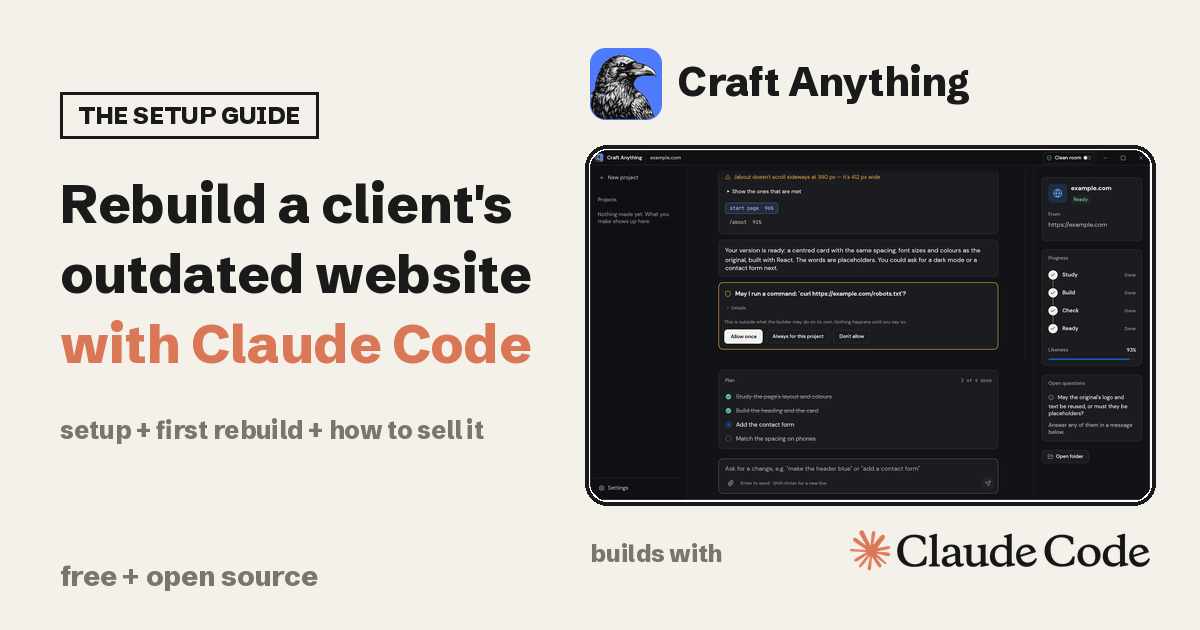
Craft Anything is made by the ArtCraft team and was created on GitHub on 31 October 2026. It had 18,972 stars on 7 November 2026, and it ranked number one on gittrend.io on 4 November (that is not GitHub's own trending page). The latest release is v0.5.0 from 6 November. The README calls the project early alpha.
Rebuild the old site. Keep the client's words. Never copy someone else's.
If you build websites for clients, the slow part is often the first draft of a redesign. Craft Anything is a way to get that draft faster: it looks at a site, has Claude Code build a new project from what it saw, and checks the result against the original. This guide covers the setup, a first rebuild, and a clear way to offer it as a service.
// Build this with your AI agent
Build this with your AI agent
Want help with the setup? Copy this prompt into Claude Code or Codex, together with this guide's link.
Read this guide: https://codewithnishant.dev/free/craft-anything-rebuild-websites/ and the official Craft Anything README at https://github.com/storytold/craft-anything. Help me install Craft Anything and run my first rebuild. First check my operating system, that Claude Code is installed and signed in (claude auth login), and whether I would rather use the installer from the latest GitHub release or build from source. Tell me which download or command you plan to use and wait for my OK before installing anything. After installing, run craft-anything-cli doctor and tell me what is missing. Then help me rebuild one website that I own, in Clean room mode, with the request "Recreate this website", into a new project folder. Show me the result, the check against the original at three screen widths and anything that does not match. Do not use a site that is not mine or that I do not have the rights to, do not publish or deploy, and ask before paid services. Tell me what is not working instead of guessing.
01. What Craft Anything is
The README describes it as an open-source, clean-room engine written in Rust. In plain words: you give it a target, say what you want, and press Start. It works in four steps and asks you when a decision is yours.
| Step | What happens (README, 7 Nov 2026) |
|---|---|
| 1. Study | It inspects the original: its pages at every width, its look, how it runs |
| 2. Build | A coding agent builds a new project in the language, framework or engine your request names, or a sensible default |
| 3. Check | It compares the build with the original, with pages at three screen widths for websites, and lists what does not match yet |
| 4. Ready | You open or preview the result, or ask for changes and it refines it |
| What | The fact (README and GitHub, 7 Nov 2026) |
|---|---|
| Made by | The ArtCraft team and contributors |
| Price | Free. MIT or Apache-2.0, at your option |
| Stars | 18,972, with 3,563 forks |
| Builder | Claude Code is supported first. A Codex adapter exists but is not verified on a real install yet |
| Targets | Websites, apps and games. Game rebuilds work in Unity, Unreal or Godot |
| Status | Early alpha, with public installers for Windows, macOS, Linux and FreeBSD |
Two things the reel could not fit. First, it builds your version, it does not copy the original. Second, it is one app in ArtCraft's "Craft" family. PhotoCraft, FilmCraft and the other Craft apps are separate apps by the same team, and Craft Anything did not build them.
02. Before you install
- A coding agent, installed and signed in. Claude Code is the one this guide uses. Install it from the official quickstart, then sign in. Craft Anything runs your own unmodified
claudeprogram with your own sign-in and never handles your account. If you are not signed in, a build stops and tells you to runclaude auth login. - Your own agreement with Anthropic. The README says your use of Claude Code falls under it, so check your plan before a long run.
- One website you own for the first test. Your own site or a throwaway page is perfect.
- Rust 1.97 or newer, only for the source route. The installers do not need it. rustup is the standard way to get it.
The README also warns that when a builder installs a project's dependencies, those commands run on your computer and the packages can run code while they install. Start with a site you trust and keep the approval prompts on.
03. Install Craft Anything
Pick one path
Which path should you pick?
- Path A (installer) if you want the app running in a few minutes and have no reason to build from source.
- Path B (from source) if you already use Rust and want the latest code on the main branch.
Path A: the installer
Go to the latest release. For v0.5.0 the files include:
- macOS:
craft-anything-0.5.0-macos-universal.dmg, for Apple silicon and Intel. The README says Mac releases are signed and notarized. - Windows: an
.msiinstaller or a portable zip, for x64, arm64 or x86. - Linux: AppImage, Flatpak, deb, rpm or a tarball. The README notes that the Flatpak is sandboxed and cannot start a browser on your computer, which studying websites needs, so use another package for that.
Every file has a checksum in SHA256SUMS.txt on the release page. The README says versions after 0.2.0 include the command line tool inside the app, so you only need the separate command line download if you want the command line without the app.
Path B: build from source
These are the README's commands. On Debian or Ubuntu the desktop app also needs a few system libraries, which the README lists.
git clone https://github.com/storytold/craft-anything && cd craft-anything
cargo run --release -p craft-anything
cargo install --path apps/craft-anything-cli
The first command downloads the code, the second runs the desktop app, and the third installs the command line tool as craft-anything-cli.
Check the install
craft-anything-cli doctorThe README says doctor checks the install, your coding agents and the engines, and tells you what is missing. Run it before your first build.
04. Your first rebuild
Do this on a site you own. The README's own screenshots use example.com, which is a fine first target if you have nothing else.
In the app
- Open Craft Anything in Simple mode, the default. It asks "What do you want to make?"
- Pick Website and type the address of the site you own.
- Choose Clean room, the default. Nothing inside the original is read, only what a visitor can see.
- Say what you want, for example "Recreate this website", and press Start.
- Watch the four steps (Study, Build, Check, Ready). When it asks a question or wants to run a command it has not run before, answer or approve in the card. Read the command before you allow it.
- Read the check. It lists what does not match yet and how alike each page is. Ask for fixes in the box at the bottom, such as "Make the header blue" or "Add a contact form".
From the command line
craft-anything-cli rebuild https://example.com "Recreate this website"
craft-anything-cli rebuild https://example.com "Make the header blue" --continue-in "<project folder>"
The first line starts a rebuild and asks its questions in the terminal. The second continues an existing project with a change. Replace the address with your own site.
Where things end up
New projects go in Documents/Craft Anything. Each project folder holds craft.json (the request and history), capture/ (what was recorded from the target), app/ (the new project), checks/ (each comparison with the original) and inbox/ (open questions). You can also start in a folder you pick: with --project-folder and --existing edit the builder edits an existing project in place.
The README's example of a finished check shows a likeness score per page. Treat that number as a guide, not a grade. Open the result on a real phone yourself.
05. Rebuilding a client's site, the safe way
This is the part I would not skip. Rebuild only websites your client owns or that you have the rights to. The README says to use Craft Anything on software you own or are allowed to examine, and that it never bypasses DRM, logins or anti-cheat. It also says the agent is told not to copy logos, photos or text unless you confirm you own them or have permission.
- Get it in writing first. A short message from the client saying you may rebuild their site is enough to start. Keep it.
- Collect their real material. Logo, brand colours, photos and the words they want on each page. The rebuilt site will have stand-in words until you replace them.
- Run the rebuild in Clean room. It is the default and the better fit for client work, because nothing inside the original is read. Deep mode reads a site's code and is meant for your own private use.
- Answer the questions honestly. When it asks whether the original's logo and text may be reused, say yes only for things the client owns.
- Improve it with the client in the loop. Ask for changes in plain words, then check the three screen widths yourself.
- Review by hand before anything goes live: every link, the contact form, page speed, page titles, image descriptions, and redirects from old addresses to new ones.
Clean room is a rule about what Craft Anything offers and refuses. The README says it is not an operating system sandbox, and the coding agent still acts as you with its own permissions. So keep client passwords, API keys and private files out of the project folder.
Seeing another brand's site you admire? Use it as inspiration for layout ideas and then design your own. Do not ship a copy of someone else's site.
06. Sell "rebuild your outdated website" as a service
My plan, not a tested playbook
I have not sold this yet, and I am not going to make up prices or results. What follows is how I would package it.
The offer in one line
"I rebuild your current website into a modern, phone-friendly version. Same pages, your words, a cleaner design, and I check it on three screen sizes before you see it."
Who to offer it to
- Your existing clients whose sites look old. This is the easiest first sale because you already have permission and trust.
- Local businesses you can reach honestly. Open their site on your phone. If it is hard to read, slow, or does not fit the screen, you have something specific to say.
How the job runs
- A short call. What the site must do, which pages stay, what the business wants people to do.
- Written permission to rebuild, as in the section above.
- A first draft from Craft Anything, using the client's own site as the target.
- Your work: real content, real photos, forms, speed, accessibility and the redirect plan. The tool gives you a draft, you give the client a finished site.
- A preview link, then changes, then launch, then a short handover note.
Pricing
I am not putting a price table here, because I have no sales to base one on. Price the job on your own hours: the call, the content work, the review and fixes, and the handover. Quote one fixed price after the call, and put what is included (pages, rounds of changes, hosting handover) in writing.
A first message you can adapt
Hi [name], I looked at [business]'s website on my phone and a few pages are hard to read and slow to load. I rebuild older sites into modern, phone-friendly versions, keeping your pages and your words. If you are open to it, I can send a short plan and a fixed price. No pressure either way.Be open that you use AI tools in your process, and agree in the contract who owns the finished site and who hosts it. New to client work? Start with my first client playbook. If you also build for clients with Claude Code, my client projects guide covers keeping that work safer.
07. Where it goes wrong
- Calling it a copy tool. It builds your own version from what it studied. Say that to clients too.
- Rebuilding a site you do not have rights to. Only client-owned sites or ones you have permission for.
- Trusting the likeness score. The check is useful, but you still review on real devices.
- Shipping stand-in words or borrowed logos. The rebuild uses stand-ins until you add the client's real content.
- Approving every command without reading. The README warns that "always allow" for
npmlets later npm commands run without asking. Only do that for a project whose dependencies you trust. - Expecting a finished product. The project says early alpha. Games, apps and non-Claude builders are less proven than websites with Claude Code.
- Mixing up the apps. PhotoCraft, FilmCraft and the others are separate apps from the same team.
08. Copyable prompts
1. First rebuild request (type it in the Craft Anything box)
Recreate this website2. A change request after the first build
Make the header blue and add a contact form. Keep the client's own text where I have supplied it, and use clearly marked stand-in text everywhere else.3. Ask your coding agent to review the rebuilt project
Review the rebuilt site in this project folder. Check every link, the contact form, page titles, image descriptions and how it looks on a phone. List what still needs the client's real content. Do not publish or deploy.4. Write the client's proposal
Write a one-page proposal for rebuilding [client]'s website: what stays, what changes, what I need from them, what is included, the number of change rounds and the timeline. Plain words, no promises about search ranking or sales. Leave the price as [price].5. Handover note
Write a short handover note for the client: what was built, what content they supplied, how it was checked, where it is hosted, who owns it and what to do if something breaks. Do not claim anything that was not actually checked.FAQ
What is Craft Anything?
Craft Anything is a free, open source app from the ArtCraft team. You point it at a website, app or game, say what you want, and a coding agent such as Claude Code builds your own version of it as a new project. It studies the original first, then compares the result with the original and keeps refining. It builds your version, it does not copy the original.
Is Craft Anything free?
Yes. The repository is dual licensed under MIT or Apache-2.0, at your option. You still need a coding agent on your computer, and Claude Code is supported first. Your use of Claude Code falls under your own agreement with Anthropic.
How do I install Craft Anything?
The simplest route is the installer for your system on the GitHub Releases page: a .dmg for macOS, an .msi or portable zip for Windows, and AppImage, deb, rpm or tarball packages for Linux. The other route is building from source with Rust 1.97 or newer: clone the repository, run cargo run --release -p craft-anything for the desktop app and cargo install --path apps/craft-anything-cli for the command line tool. Then run craft-anything-cli doctor to see what is missing.
Do I need Claude Code?
You need a coding agent that is installed and signed in. Claude Code is supported first, and Craft Anything runs your own unmodified claude program with your own sign-in. The README says a Codex adapter exists but has not been verified on a real install yet. Before a build, sign in with claude auth login if you have not already.
Can I rebuild any website with it?
No. Rebuild only websites your client owns or that you have the rights to. The README says to use Craft Anything on software you own or are allowed to examine, and the agent is told not to copy logos, photos or text unless you confirm you own them or have permission. Use other sites as inspiration for your own design, never as something to ship a copy of.
What is the difference between Clean room and Deep mode?
Clean room is the default. Nothing inside the original is read, not its code, files or page source. It works from what a visitor can see: screenshots, visible text, measured layout, colours, fonts and spacing. Deep mode uses every tool, including reading a website's JavaScript, and is meant for your own private use. Clean room is a rule about what Craft Anything offers and refuses, not an operating system sandbox.
Is Craft Anything ready for client work?
Treat it as a fast first draft. The README calls it early alpha. Review every rebuilt site by hand on real phones and browsers, check forms, links, speed and accessibility, and add the client's real content before anything goes live.
Did the Craft Anything team make PhotoCraft and FilmCraft too?
Yes, the same team makes the other Craft apps, such as PhotoCraft and FilmCraft, as separate apps. They are listed in the Craft Anything README, but they are not part of Craft Anything and Craft Anything did not build them.
What I checked, and what I did not
On 7 November 2026 I read the official README, the Claude Code page and the v0.5.0 release, and checked the repo on the GitHub API: 18,972 stars, 3,563 forks, Apache-2.0 detected with the README stating MIT or Apache-2.0, created 31 October 2026, last push 7 November. Every command and fact above comes from those pages. I did not install or run Craft Anything myself, so I cannot say how a rebuild looks on your site. The business section is my own plan, not something I have sold. The README changes often and the project is early alpha, so check it again before you install.
Own it, rebuild it, review it, then sell the finished site. The tool just makes the first draft faster.
// Free newsletter
I send out guides like this every week
Real setups, real sources, no hype. Drop your email and I'll send you the next one.