
Billion-Context is a free, open source context tool by GitHub user ranxianglei. It runs on your machine, between your coding agent and the model API. The model folds old messages into notes on its own, a few at a time, and keeps working in the same chat.
Don't throw old context away. Fold it.
// Build this with your AI agent
Build this with your AI agent
Want to try it? Copy this prompt into Claude Code or any coding agent, together with this guide's link.
Read this guide: https://codewithnishant.dev/free/billion-context-claude-code/ and the official Billion-Context README linked from it. Help me try Billion-Context with Claude Code on this machine. First check my Node and npm versions, where global npm packages install, and whether ~/.local/bin is on my PATH. Then install it with npm install -g billion-context --prefix=~/.local (or plain npm install -g billion-context if I use nvm or Homebrew Node) and confirm bili --version works. Use the launcher route first: tell me to run bili claude inside a small test project, not my main work. Do not edit my ~/.claude/settings.json unless I say so, and never print my API keys. Finish by showing me how to check the cache hit rate and how to undo everything.
01. The auto-compact problem
Every model has a context window, a limit on how much chat it can read at once. Claude Code's own docs say auto-compaction "summarizes conversation history when approaching context limits".
That keeps the chat alive. The catch:
- One big summary. Hours of work become a few paragraphs.
- Small details drop. The exact file path, the error you already fixed, the reason you picked one library over another.
- No way back. Once it is summarized, Claude cannot reread the original messages.
So you end up explaining the same thing twice, in the same chat.
02. How Billion-Context works
Billion-Context is a proxy. You point your agent at it, and it forwards every request to the real model API. On the way, it adds four tools the model can call by itself:
| Tool | What it does |
|---|---|
compress | Folds a range of old messages into a detailed summary |
decompress | Opens a folded range back up when an exact detail is needed |
search_context | Keyword search over the folded notes and the visible messages |
acp_status | Shows context use and which ranges can still be folded |
Three things make it different from a normal summary, per the README:
- Small steps. It folds a few messages at a time, not the whole chat at once.
- Reversible. A folded range can be opened again with
decompress. - Cache friendly. The start of the chat stays the same, so the provider's prompt cache keeps working. That is where the token savings come from.
The model decides when to fold. The first fold usually comes about 50K tokens after the chat starts, and the proxy steps in as a backstop if the input alone would overflow the window.
03. Set it up for Claude Code
About 5 minutes if Node is ready
1. Install it. On macOS or Linux, the README recommends a user-level install, no sudo:
npm install -g billion-context --prefix=~/.localThis gives you the bili command in ~/.local/bin. If your terminal says command not found, add this line to ~/.zshrc or ~/.bashrc and open a new terminal:
export PATH="$HOME/.local/bin:$PATH"On nvm or Homebrew Node, or on Windows, plain npm install -g billion-context works.
2. Pick one way to run it. You need only one:
| Way | Command | Good for |
|---|---|---|
| Launcher | bili claude | Trying it. Starts the proxy and Claude Code together, edits no config file. |
| Native install | bili plugin install claude | Daily use. Then start claude as usual. |
| Plugin menu | 3 commands, below | Same result as the native install, from inside Claude Code. |
For the plugin menu way, run these three in Claude Code, then restart it:
/plugin marketplace add ranxianglei/billion-context
/plugin install billion-context@billion-context
/billion-context:bili-setup
What the native install changes. It writes a managed block into ~/.claude/settings.json: Claude Code's API address now points at the local proxy, its own auto-compact is turned off (DISABLE_AUTO_COMPACT=1), and a start-up hook launches the proxy with each session. Your other settings are not touched, per the technical notes.
3. Work like normal. You do not call the tools yourself. Claude calls them as the chat grows.
To undo it: run bili plugin remove claude, which restores your settings exactly. With the launcher, just start claude without bili again.
04. Check it is working
The number to watch is the prompt cache hit rate. The README's rule of thumb: a healthy session sits at 95 to 97%, and folding itself costs 2% or less.
- Native install: type
/acp-cachein Claude Code. You get a text report with your hit rate, a HEALTHY verdict when things are fine, and a link to a web page with a chart. - Launcher: ask Claude to call its
acp_cachetool and paste the report, or itsacp_statustool for context use. - Log file:
~/.local/state/billion-context/bili.log. Look for aprocessTurnline per request and, once the chat grows, acompressevent.
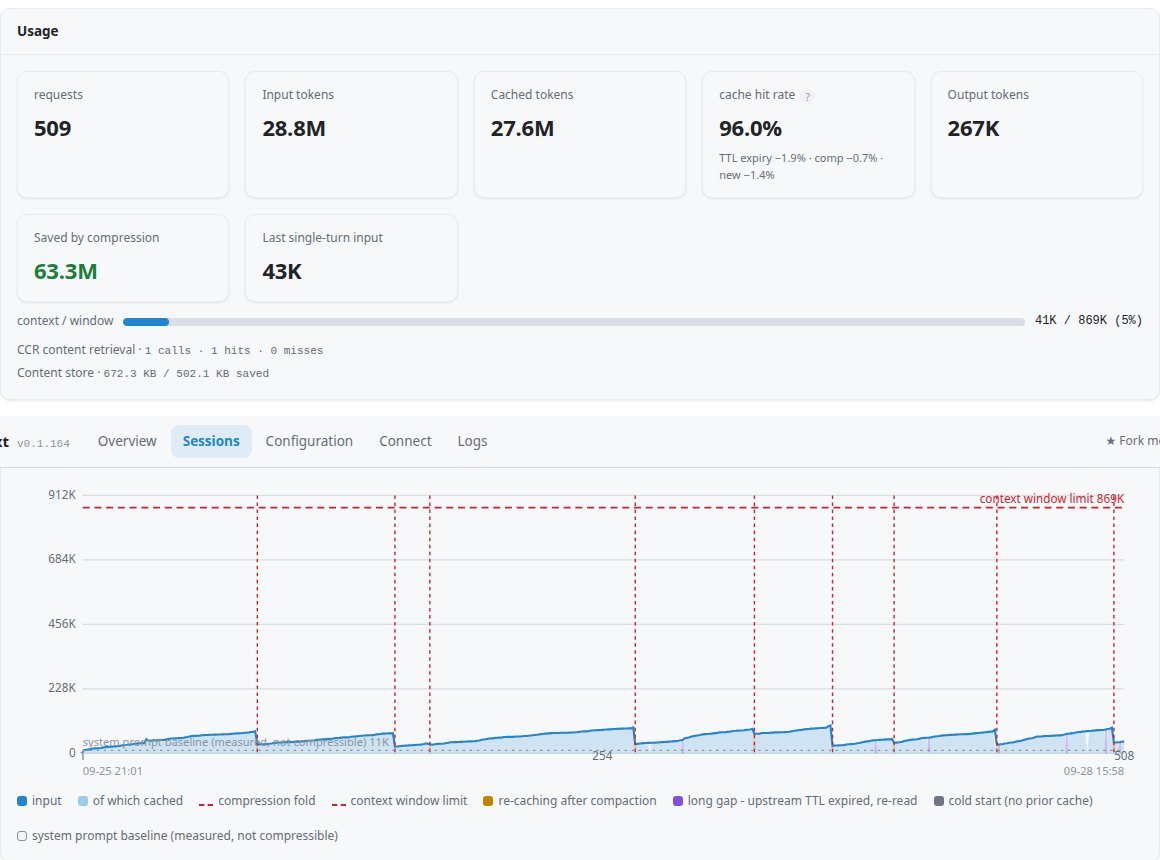
Hit rate low for a long time? The README lists the usual causes, in this order:
- The provider's cache expired while you were away.
- You switched models mid-chat.
- A bug in the tool, which the maker asks you to report.
05. Codex, Gemini CLI and about 18 others
The README's "Which do I need?" table lists 21 clients, Claude Code included. The pattern is the same: bili plus the agent's name.
| Agent | Command |
|---|---|
| Codex | bili codex (the full setup; the plugin install alone needs bili already running) |
| Gemini CLI | bili gemini (launcher only) |
| OpenCode | bili opencode or bili plugin install opencode |
| Aider | bili aider |
| GitHub Copilot CLI | bili copilot |
| Anything with an editable API address | Run bili, then put http://localhost:8787/bili/ in front of the agent's base URL |
Others on the list include pi, Kimi Code, Qwen Code, Antigravity, Hermes, Amp, Crush, Zed and Goose. Cursor is not on it as of 2 November 2026. The client guide has the details per agent.
06. What the maker's paper reports
The repo ships a paper by the maker. These are their numbers from their own setup, not mine:
| What | Their number |
|---|---|
| How long | About 4.5 months (23 April to 7 September 2026), one expert user, three machines |
| Model calls on the main machine | 174,327 |
| Total input tokens | 18.76B there, about 24.7B across all three machines, mostly cache re-reads |
| Calls on 204,800-token models | 42,986, with zero times over the window |
| Longest sessions | 8,584 and 12,049 calls |
| Controlled test | 31 to 54% fewer billed tokens than keeping the full history, 63% fewer re-fetch calls, no measurable recall loss at default settings |
Read these with the context around them:
- Not Claude. The runs used GLM-5.1, 5.2 and 5.3, sometimes Qwen and GPT-class models. The controlled test used one model, Qwen3.8-27B.
- One user. The paper lists its own limits: single user, observational, savings partly modelled.
- The "5x fewer tokens" line is a model. In the paper it is an estimate for the longest session (about 5.3x), and 1.2 to 1.8x on 200K windows. The measured test is the 31 to 54%.
- The idea is not new. The paper itself says model-driven compression goes back to MemGPT. What it adds is the small, reversible, cache-friendly folding.
07. Honest limits before you trust it
- It is early. The README's status line says early, expect rough edges. The repo had about 730 open issues and pull requests on 2 November, and new versions ship almost daily (v0.1.211 on 1 November).
- Your traffic goes through it. Every prompt and every piece of code you send passes through the proxy on your machine. Session data is stored in
~/.local/share/billion-context/. - Auto mode check. By default it answers Claude Code's auto mode safety check itself with "allow", to save cost, per the config docs. Want the real check? Set
BILI_AUTO_MODE_FORGE=0. - The window does not grow. Claude still reads the same size window. Folding keeps the chat under it.
- License has one extra term. It is MIT plus a rule: a product or service people can see that uses it must credit billion-context with a link. Read the LICENSE before you build it into anything.
So start on a side project with nothing sensitive in it. Move your main work over only after it has behaved for a while.
08. How to use it well
- Use it for long build sessions. One project, many hours. Quick one-off questions do not need it.
- Stay on one model per chat. A model switch throws away the prompt cache, and the next request pays full price.
- Check
/acp-cacheafter the first hour. If the hit rate is near 95%, it is doing its job. - Long breaks cost more. The provider's cache expires while you are away, so the first message after a break is billed higher.
- Keep your project memory anyway. A good CLAUDE.md file and Claude Code's own memory still matter, folding is not a replacement for clear instructions.
- Restart after updates. The proxy installs new versions in the background, but you need to restart
bilito run them.
Running Claude Code on cheaper models to stretch long sessions further? My free LLM APIs guide covers that side.
FAQ
What is Billion-Context?
Billion-Context is a free, open source proxy by GitHub user ranxianglei. It sits between a coding agent like Claude Code and the model API, and gives the model four tools to fold old messages into detailed notes, reopen them, search them and check context use.
Does Billion-Context work with Claude Code?
Yes. Install it with npm, then run bili claude to start Claude Code through the proxy, or run bili plugin install claude for a native setup that starts with every Claude Code session.
Does Billion-Context replace Claude Code auto-compact?
Yes, in the native setup. bili plugin install claude sets DISABLE_AUTO_COMPACT=1 in your Claude Code settings, and the model folds old messages a few at a time with the compress tool instead of squashing the whole chat into one summary.
Is Billion-Context free?
The code is free under the MIT license plus one extra term: a product or service people can see that uses it must credit billion-context with a link. You still pay your model provider for the tokens you use.
Does Billion-Context give Claude a billion-token context window?
No. The model keeps its normal context window. The billion is the total tokens a long session can process over its life, mostly cache re-reads, because old messages keep getting folded into short notes.
Is Billion-Context safe to use?
Its README calls it early and says to expect rough edges. All your model traffic, including your code, passes through a proxy on your own machine, so try it on a side project you do not mind breaking before your main work.
How do I remove Billion-Context?
For the native setup run bili plugin remove claude, which restores your Claude Code settings exactly. For the launcher just start claude normally again. Then uninstall the npm package with npm uninstall -g billion-context, using the same prefix you installed with.
Does Billion-Context work with Cursor?
Cursor is not in the README's supported client list as of 2 November 2026. Codex, Gemini CLI, OpenCode, Aider, GitHub Copilot CLI and about 15 other coding agents are.
What I checked, and what I did not
On 2 November 2026 I read the official README, CLIENTS.md, CONFIGURATION.md, TECHNICAL-NOTES.md and the paper, and checked the repo on the GitHub API: 3,658 stars, latest release v0.1.211. I did not install or run Billion-Context. Every number above is the maker's. Thanks to ranxianglei for publishing the code and the paper in the open.
Try it on one long side project this week. If you stop re-explaining things to Claude, it earned its place.
// Free newsletter
I send out guides like this every week
Real setups, real sources, no hype. Drop your email and I'll send you the next one.